
Discover how GE Appliances Alexa integration transforms your home. Learn to control GE air conditioners with voice, check WiFi capability, and set up SmartHQ™ today!
There is a specific kind of modern magic in walking into a sweltering kitchen with groceries in both hands and simply saying, “Alexa, set the air conditioner to 70 degrees.” No fumbling for a remote, no oily fingerprints on a control panel—just a house that listens.
As voice-activated appliances move from "futuristic novelty" to "everyday essential," GE Appliances has emerged as a leader in making this integration seamless. If you are wondering how to turn your living space into a voice-controlled haven, or even if your current fridge is "smart" enough to talk to, you’re in the right place.
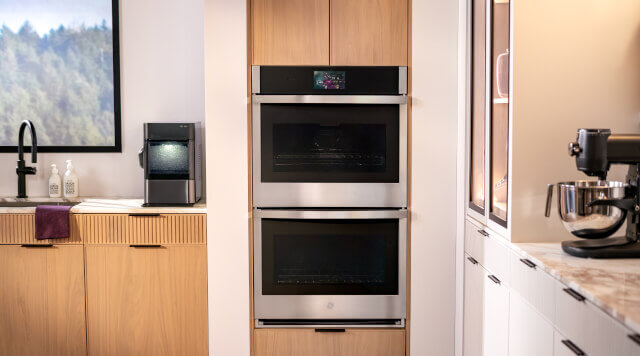

Does My GE Appliance Have WiFi Capability?
Before you can start barking orders at your dishwasher, you need to know if it can actually "hear" your home network. Many people assume that because an appliance has a digital display, it’s smart. That’s not always the case.
The quickest way to check is to look for the Connected Appliance Information label. On ovens, it’s usually tucked just inside the door; on refrigerators, it might be on a side wall or behind the kickplate. If you see a label with a WiFi network name (SSID) and password, you’re in business.
From a user experience perspective, I always suggest checking the SmartHQ app first. If you can’t find a physical sticker, try searching your model number on the GE Appliances website under the "Specs & Details" tab. Look specifically for "WiFi Connect" or "Built-In WiFi." Some models are "WiFi Capable," meaning they require an optional ConnectPlus module to get online. It’s a small extra step, but it breathes new life into older hardware.
Setting Up GE Appliances Alexa Integration
The bridge between your "dumb" chores and your smart home is the SmartHQ™ app. GE’s integration with Amazon Alexa doesn't just happen by magic; it requires a specific "skill."
Connect to SmartHQ: First, get your appliance onto your home WiFi using the app. This is usually the part where people get stuck. Pro-tip: Make sure your phone is on a 2.4GHz network during setup, as most appliances won't see 5GHz bands.
Enable the Skill: Open your Alexa app, search for the SmartHQ Skill, and link your GE account.
Discover Devices: Once linked, tell Alexa, “Discover my devices.”
I remember the first time I linked my GE Profile washer. I was skeptical. But after the initial setup, being able to ask, "Alexa, what is the dishwasher status?" while I was in the middle of a Zoom call in the other room felt like a genuine productivity win.
Control GE Air Conditioner with Voice: A Summer Game Changer
Controlling your climate is perhaps the most satisfying use of GE’s smart tech. Whether you have a window unit or a ducted system, the voice commands are surprisingly intuitive.
You aren't just limited to "On" and "Off." You can get specific:
"Alexa, set the air conditioner to 72 degrees."
"Alexa, set the air conditioner fan speed to high."
"Alexa, what temperature is it in here?"
From personal experience, the real "pro move" is setting up Alexa Routines. I have a "Goodnight" routine where Alexa dims the lights, locks the door, and sets my GE air conditioner to a cool 68 degrees. It removes those tiny points of friction from your evening that you didn't even realize were bothering you.
Watch: The Future of Cool
Want to see how voice control transforms your summer comfort? This video highlights the seamless connection between GE Appliances and Amazon Alexa, showing you how to manage your home’s climate without ever lifting a finger. It’s the perfect visual companion to understanding why smart AC units are the ultimate summer upgrade.
Why Voice Activated Appliances Matter
Beyond the "cool factor," voice-activated appliances offer serious benefits:
Accessibility: For individuals with mobility issues or visual impairments, being able to preheat an oven or start a laundry cycle via voice is a massive boost to independence.
Hygiene: In the kitchen, your hands are often covered in flour, raw meat, or soap. Voice control keeps your expensive appliance finishes clean and germ-free.
Multitasking: If you are a parent or a busy professional, "hands-free" isn't a luxury—it’s a necessity.
Common Troubleshooting: When Alexa Isn’t Listening
Every smart home enthusiast has been there: you give a command, and Alexa responds with, "I'm sorry, I'm having trouble connecting." Usually, this isn't a hardware failure; it's a "handshake" issue.
If your GE appliance stops responding, try the "Off and On" method—not for the appliance, but for the skill. Disable the SmartHQ skill in the Alexa app and re-enable it. This refreshes the security token and usually fixes 90% of connectivity drops. Also, keep an eye on your SmartHQ app for firmware updates; GE frequently pushes patches that improve voice recognition accuracy.
Frequently Asked Questions
How do I know if my GE appliance has WiFi capability?
Check for a "Connected Appliance" label inside the door or on the side of the unit. If it displays a Network (SSID) and Password, it’s WiFi-ready. Alternatively, search your model number on the GE website for "Built-In WiFi" specs or check if it appears in the SmartHQ™ app during the "Add Device" process.
How do I connect my GE smart appliance to Amazon Alexa?
First, connect your appliance to the SmartHQ™ app. Then, open the Alexa app, search for and enable the SmartHQ skill, and link your GE account. Once authorized, say, "Alexa, discover my devices." Your appliance will now respond to voice commands like "Alexa, preheat the oven to 350."
Can I control my GE air conditioner with voice commands?
Yes. Once integrated with Alexa via the SmartHQ skill, you can use hands-free commands such as "Alexa, set the air conditioner to 72 degrees" or "Alexa, turn on the AC." You can also voice-adjust fan speeds and check the current room temperature without needing a physical remote or touching the control panel.
Final Thoughts
The transition to a voice-controlled home doesn't have to happen overnight. Start with one device—perhaps a room air conditioner or a microwave—and see how it fits your rhythm. Once you experience the convenience of GE Appliances’ Alexa integration, going back to pushing physical buttons feels like stepping back into the Stone Age.
Your home is getting smarter. It’s time to start talking to it.
Related Posts
Smart Kitchen Appliances | Members Mark Kitchen Play Center with Food
I will be showing you the tour. I put some food and some stuff in here. Some, a lot of food. So in the fridge, some cream, some fruit and some eggs. I'm going to put the eggs with you now.
GE Smart Appliance App | GE Profile All In One App Review
GE Smart Appliance App. This is an update on the GE Profile All in one Ventless Washer and Dryer. This particular unit uses a heat pump that warms the air.
Best Electric Tea Kettle in 2024 – Smart Choice
Talk about the top-rated 7 Electric Tea Kettle. Based on my personal experience and opinion. The Kettle Liners, in their live spout and rim, are made of food grade 304, durable stainless steel.
Notice: Internet users spontaneously contributed the article content, and the article views only represent the author himself. This site only provides storage services, does not have ownership, and bears relevant legal liabilities. If you find plagiarism, infringement, or illegal content, please contact the administrator to delete it.