
Mastering Your GE Front Load Washer: A Complete Guide to Electronic Touch Controls
Learn how to use and maintain the GE Front Load Washer with Electronic Touch Controls. Master the light-touch interface, avoid panel damage from pre-treatments, and get expert tips for your GE laundry appliance. Read our guide!
The modern laundry room has undergone a digital transformation. Gone are the days of heavy mechanical dials that clunk into place; today’s premium appliances, like the GE Front Load Washer, feature sophisticated Electronic Touch Controls. While these sleek, glass-like interfaces offer a premium aesthetic and advanced cycle customization, they require a different touch—literally—than the washers of the past.
If you have recently upgraded your home with a GE appliance, understanding how to interact with your control panel is the key to ensuring both the longevity of the machine and the cleanliness of your clothes. In this guide, we will break down everything you need to know about using your GE washer’s touch screen effectively.
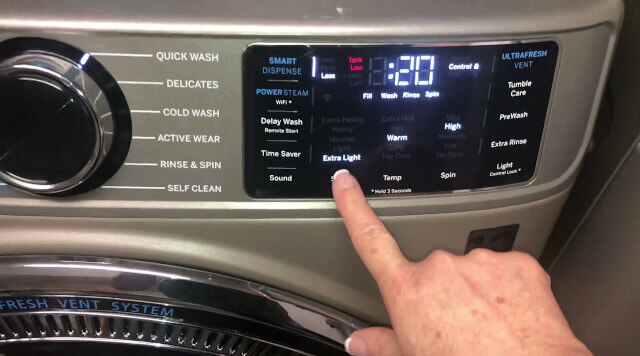

Understanding the "Touch" in Electronic Touch Controls
One of the most common points of confusion for new owners is the physical feedback of the panel. Unlike a traditional button that "clicks" or "depresses," the Electronic Touch Controls on a GE Front Load Washer operate on capacitive or pressure-sensitive technology similar to a smartphone or tablet.
How to Interact with the Panel
To activate a feature or select a setting, you do not need to apply heavy pressure. In fact, pressing too hard can be counterintuitive.
The Light Touch: Simply use the pad of your finger to touch the white lettering of the desired option.
Visual and Audible Feedback: When a selection is successfully made, the washer will provide a clear signal. You will hear a rhythmic tone, and the specific text or icon will become high-lighted, indicating that the command has been registered by the control board.
Navigating the Hybrid Interface: Knobs vs. Screens
While the heart of the interaction happens on the touch-sensitive surface, GE Front Load Washers typically utilize a hybrid interface. Understanding which parts move and which do not is essential for proper operation.
The Cycle Selector Knob: This is a physical, rotating dial. You turn this to choose the base wash program (such as Normal, Whites, or Delicates).
The Power and Start-Pause Buttons: These are usually physical buttons that require a standard press to engage.
The Touch Screen/Pad: Located typically to the right of the knob, this flat surface houses your "Modifiers" (like Temperature, Spin Speed, and Soil Level) and "Options" (like Extra Rinse or PreWash).
Pro Tips for Daily Operation
Using a GE Front Load Washer efficiently involves more than just hitting 'Start.' To get the most out of your electronic interface, follow these operational best practices:
Dry Hands are Better: While the panels are designed for the laundry room environment, extreme moisture on your fingertips can sometimes interfere with the sensors' ability to detect a touch.
Wait for the Tone: If you are selecting multiple options (e.g., changing temperature and adding a steam cycle), wait a split second for the confirmation beep before touching the next option. This ensures the internal processor has logged each specific instruction.
The "Hold" Commands: Some features, like "Control Lock" or "Delay Wash," may require you to touch and hold the text for three seconds. Always look for small sub-text on the panel that indicates a "3-sec hold."
Maintenance: Protecting Your Digital Investment
The electronic control panel is the "brain" of your appliance. Because it is an electronic component, it is susceptible to damage from harsh chemicals and improper cleaning techniques.
The Danger of Laundry Pre-treatments
This is perhaps the most important maintenance rule: Keep laundry pre-treatment aerosols and stain removers away from the control panel. Many consumers spray collars or stains while standing directly over the washer. The chemicals in these pre-treatments can degrade the plastic overlay of the touch screen, causing it to become cloudy, cracked, or unresponsive over time. Always apply these treatments over a sink or away from the machine.
How to Clean the Touch Screen
Use a Damp Cloth: Use a soft, microfiber cloth slightly dampened with water.
Avoid Cleaners: Do not use window cleaners, abrasive powders, or flammable liquids on the electronic controls.
Immediate Wipe-down: If detergent or softener accidentally splashes onto the screen, wipe it off immediately with a dry paper towel or damp cloth to prevent filming.
Troubleshooting Unresponsive Controls
If you find that your Electronic Touch Controls are not responding, check the following before calling for service:
Control Lock: Check if the "Control Lock" light is illuminated. This feature is designed to prevent accidental starts (or "help" from children). Hold the designated button for three seconds to unlock.
Power Cycle: Much like a computer, sometimes the digital board needs a reset. Unplug the washer for 60 seconds and plug it back in to refresh the interface.
Clean the Surface: A buildup of film or detergent residue can "blind" the touch sensors. A thorough, gentle cleaning often restores functionality.
Frequently Asked Questions
How do I correctly select a cycle on my GE washer touch screen?
Use a light touch to tap the white lettering of the desired function. Unlike physical buttons, these Electronic Touch Controls respond to a gentle press. Once a selection is made, the washer will emit a rhythmic sound, and the chosen option will become high-lighted on the display.
Which buttons on my GE Front Load Washer are not touch-sensitive?
The Cycle Selector knob, Power button, and Start-Pause button are physical controls and are not part of the electronic touch panel. Only the modifier text (like Temperature or Soil Level) and option settings are activated via the touch-sensitive surface.
How should I clean and maintain the GE washer electronic control panel?
Clean the panel with a soft, damp cloth and wipe it dry immediately. Crucially, keep laundry pre-treatment chemicals and stain removers away from the interface, as they can damage or crack the electronic touch screen. If a spill occurs, clean it instantly to prevent long-term damage.
Conclusion
The GE Front Load Washer with Electronic Touch Controls represents a leap forward in laundry precision. By mastering the light-touch technique and keeping the panel free from chemical interference, you ensure that your appliance remains a reliable, high-performing centerpiece of your home for years to come. Always refer to your specific model's Owner’s Manual for unique feature sets, but with these universal tips, you are ready to tackle any load with digital confidence.
Related Posts
Guide to Discontinued GE Monogram Appliances and Parts
Struggling with discontinued GE Monogram appliances? Learn how to find NLA parts, download old Monogram manuals, and navigate repair solutions when your luxury kitchen components are no longer available.
SmartHQ App Push Notifications Not Working?
Not receiving SmartHQ app push notifications? Learn how to enable notifications on the SmartHQ app for your GE smart appliance app with our step-by-step troubleshooting guide and expert support tips.
How to Schedule a Service Appointment for your GE Appliance
How to Schedule a Service Appointment for your GE Appliance? While on the GE website, you can also find appliance manuals, support videos and general FAQs. We'll focus on scheduling a service appointment.
Notice: Internet users spontaneously contributed the article content, and the article views only represent the author himself. This site only provides storage services, does not have ownership, and bears relevant legal liabilities. If you find plagiarism, infringement, or illegal content, please contact the administrator to delete it.